

 Tiếng Việt
 日本語
What is Trailhead? It is Salesforce’s free online learning platform, with short modules and hands-on exercises in a real environment, so you can do what you just learned right away. It is also the question the Sonix team gets most from friends: where do I start learning Salesforce?
The short answer: follow four stages from easy to hard. One, basic CRM concepts and navigation. Two, data: objects, fields, reports. Three, automation: Flow and approvals. Four, security and permissions. One important tip: whatever you finish, do it right away in your own org.
Important note: this is a suggested path from the Sonix team for beginners, not an official Salesforce training program. Module names, trails, durations and content on Trailhead change over time, so check the official site. Trailhead is free but certification exams have their own requirements and cost, and the article gives no figures. The office equipment distributor below is a hypothetical example.
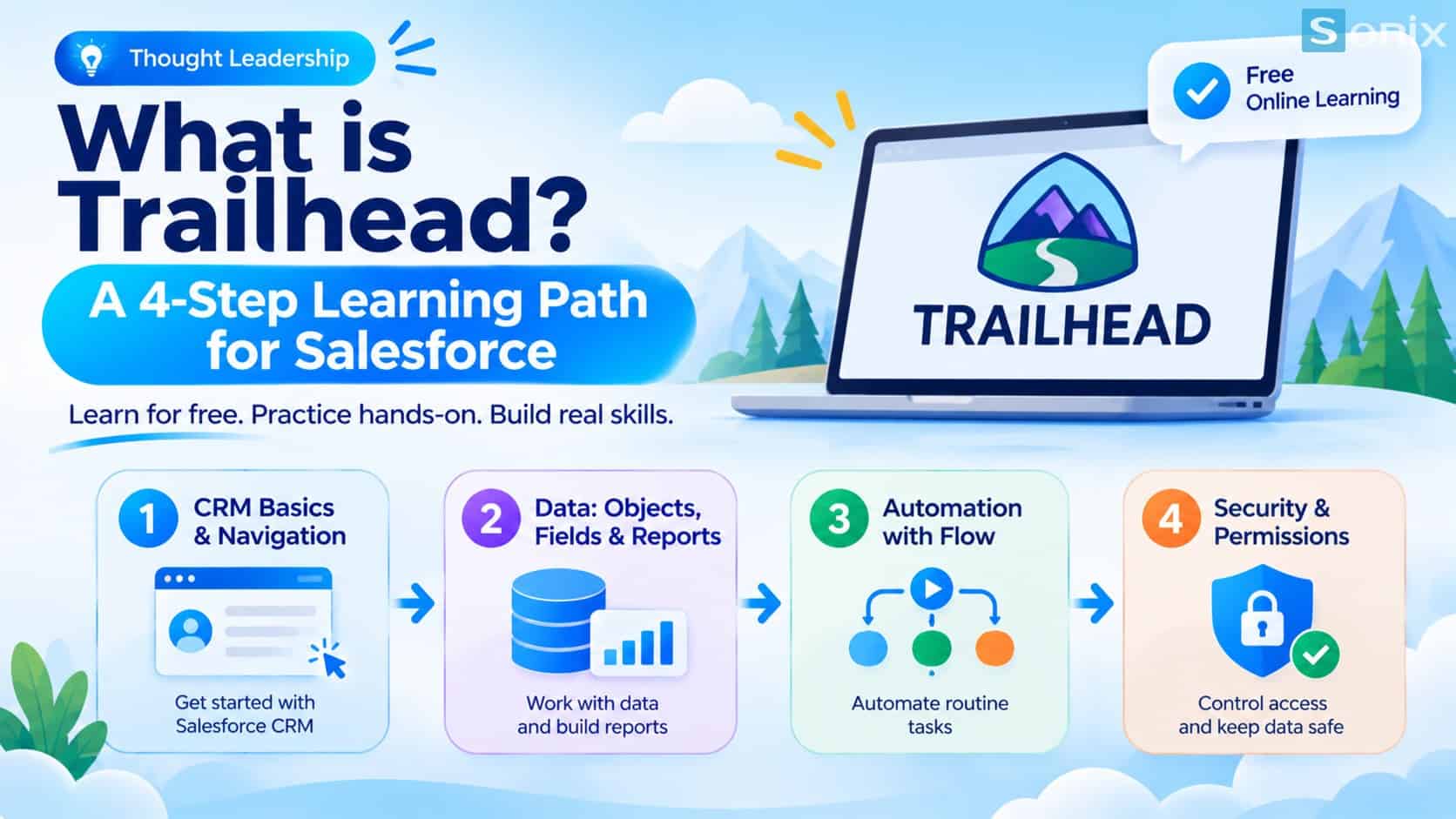 Four stages of learning Salesforce on Trailhead, from easy to hard.
What is Trailhead and what is it made of
According to Salesforce’s official introduction, Trailhead is a free online learning platform, and you can sign up without a Salesforce CRM account. The content is broken into small pieces so you learn step by step.
| Component | What it is | Use it when |
|---|---|---|
| Module | A short learning unit on one specific topic | You want to understand a concept or feature |
| Trail | A series of modules toward one goal | You want to learn systematically, such as Admin Beginner |
| Project | A step-by-step hands-on scenario | You want to do something specific, such as build a report |
| Hands-on challenge | A check at the end of a unit, done in a practice environment | You want to test whether you understood |
| Trailhead Playground | Your own practice environment | You want to try things without fear of breaking anything |
A 4-stage free path to learn Salesforce for beginners
The four stages below are the order we suggest for beginners. Module names follow common modules on Trailhead and may be renamed or updated.
Stage 1: basic CRM concepts and navigation
- Start with modules such as Salesforce Platform Basics, Salesforce CRM and the Admin Beginner trail
- Goal: understand what a CRM does and find your way around menus, records and apps
Stage 2: data, including objects, fields and reports
- Take the Data Modeling module to understand objects, fields and the relationships between them, then Reports & Dashboards for Lightning Experience and the report projects
- Also learn to calculate numbers with formulas in the Formula Field module. Read alongside Salesforce 101: how Standard and Custom Objects differ and Salesforce Formula Field
Stage 3: automation, including Flow and approvals
- Take a Flow trail such as Automate Your Business Processes with Salesforce Flow, then the module on approvals
- Goal: automate repetitive work, such as lead routing or discount approvals
Stage 4: security and permissions
- Take modules such as Security Basics and Data Security
- Goal: understand who can see and edit which data. This is easy to skip but decides a lot later on
Study tip: practice in your own org
This is the tip we stress most: whatever you finish, do it right away in your own org. Understanding and being able to do are two different things.
According to reference sources, you can sign up for a free Developer Edition to practice in a real Salesforce environment. A Trailhead Playground is also your own practice environment, used for the challenges. Check the terms of use and lifetime of each type of org on the official site.
| After finishing | Do right away in your org | Hypothetical example |
|---|---|---|
| Stage 1 | Create a few sample customers and contacts | Enter 5 customers of an office equipment distributor |
| Stage 2 | Create one object and one report | A Rental Contract object, a report of deals by stage |
| Stage 3 | Build one simple Flow | Automatically assign lead owners by region |
| Stage 4 | Create a few users with different permissions | Check what a sales rep and a manager each see |
Once you have the basics, articles such as Salesforce Dynamic Dashboard or our Salesforce Sales Cloud setup guide in 10 minutes make good practice exercises.
After four stages: Salesforce certification
Many people study on Trailhead aiming for a certification, such as Administrator. According to Salesforce’s page, exam topics include managing users, data and security, maintaining and customizing Sales Cloud and Service Cloud apps, and building reports, dashboards and workflows. The four stages above cover most of these topics.
Two things to remember. One, Trailhead helps you prepare, but the certification exam is a separate step. Check eligibility, fees and exam languages on the official site because they change. Two, a certificate does not replace real experience, so always combine it with practice.
Notes for learning effectively
Content is mostly in English. That is easy if you are used to technical English, otherwise set aside time for the terminology.
Do not chase badges. Badges and points are a way to track progress, not the goal. Understanding and being able to do are the goal.
Learn from real problems. Pick a problem from your current work, such as manual calculations or manual reports, then find the module that solves it. This keeps motivation better than following a list.
Information changes. Trailhead updates constantly, so names and module order may differ from this article by the time you study.
If you want to talk about applying Salesforce in your business, see Sonix’s Salesforce solutions (in Vietnamese).
Checklist for learning Salesforce on Trailhead
Tick off what you have done.
☐ Signed up for Trailhead and explored the interface
☐ Completed the basic CRM concepts and navigation modules
☐ Studied Data Modeling and built a report in your own org
☐ Built a simple Flow to automate a repetitive task
☐ Studied security and permissions and tested with a few sample users
☐ Set up your own practice org to use after each stage
☐ Checked certification requirements if that is your goal
Are you learning Salesforce? Comment to check in and the Sonix team will send you a list of specific modules.
Sonix Vietnam
Guide
Digital Transformation
Book a consultation with Sonix to turn Salesforce knowledge into real configuration that fits your sales process.
Sonix: Your success is our happiness.
Leave us your comment