

 Tiếng Việt
 日本語
日本語A water pump reports an anomaly at 2 a.m. The control room screen lights up red. Then what? Equipment alerts from building management systems (BMS) and IoT are very good at detection, but they usually stop right there: they do not become a job with an owner and a deadline.
The short answer: if the BMS can export alerts through an API, you can create a Case in Salesforce automatically, then turn it into a Work Order in Field Service. The job is tied to the right equipment, location and technician, the technician receives it on a phone app and takes photos as sign-off.
Important note: this depends on the BMS vendor and how each building’s system is configured, so a survey is needed before making promises. This article does not claim integration with any specific vendor. Field Service is a separate license. The building and scenarios in the article are illustrative assumptions, not a real customer.
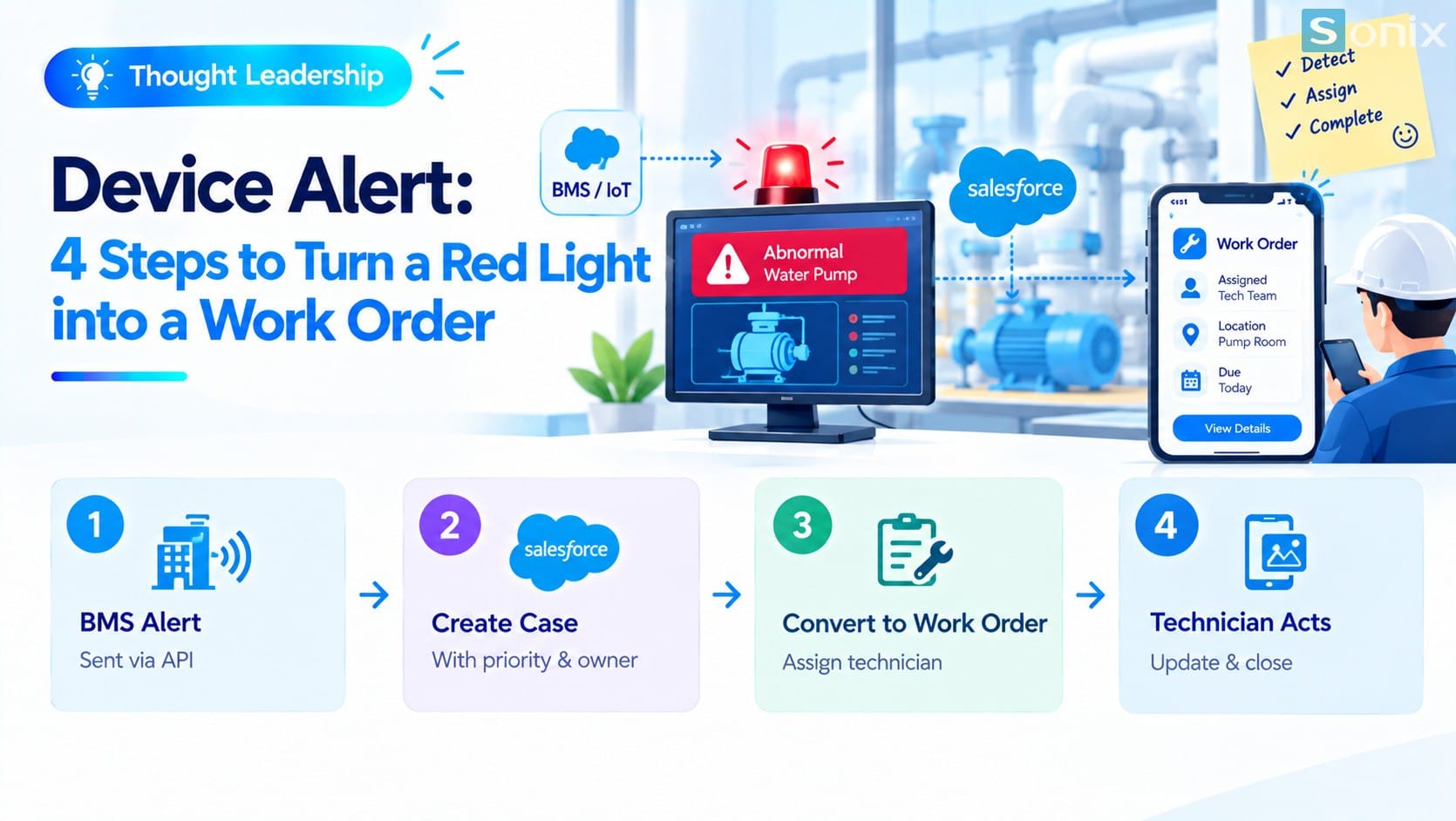 The flow from BMS and IoT alerts to Case, Work Order and sign-off.
Why equipment alerts stop at the control room
Building management systems (BMS) and IoT sensors are designed to collect signals and detect anomalies. Turning a signal into a job with an owner usually lies outside their scope.
So the real process depends on people. The duty operator sees the red light, phones or messages someone, and after that everything runs on memory. There is no job number, no deadline, and at the end of the shift nobody is sure whether the work is done.
For leadership, three things follow. It is hard to prove an incident was handled on time. It is hard to see which equipment fails repeatedly. And when a tenant asks, there is no record to answer with. This is an operations question, not just a technology one: early detection only has value when someone acts.
The 4-step flow from alert to work order
The alert leaves the BMS
- If the BMS or IoT system can export alerts through an API, an integration layer can receive them and pass them to Salesforce
- The alert should carry the equipment ID, location, type of anomaly and time
Create a Case in Service Cloud
- Each qualifying alert is recorded as a Case with a number, a priority and an owner
- The Case is linked to the equipment (Asset) so you can see that item’s failure and maintenance history
Turn the Case into a Work Order in Field Service
- A Work Order describes what needs doing, while a Service Appointment says when and where
- The job carries the skills required and a suitable group of technicians, for example electrical or plumbing
The technician receives the job and signs off
- The technician receives the job on a phone app and sees equipment information and handling history
- After the fix, they take sign-off photos and notes, then close the job
- The Case and Work Order keep everything for lookup and reporting
The Case and priority part is covered in detail in Repair Tickets: 4 Priority Levels, No Request Forgotten.
Practical conditions before promising an integration
The flow sounds simple, but every link in the chain has conditions. The table below lists questions to answer in the survey, before committing to a customer.
| Condition | Why it matters | Question to ask |
|---|---|---|
| Does the BMS have an API | Without a way to export alerts, nothing can be automated | What export methods does the BMS vendor support, and are there fees or limits? |
| Do alerts carry enough information | Without an equipment ID or location, the job cannot be tied correctly | Which fields does each alert carry? |
| Equipment list (Asset) | Equipment in the BMS must match equipment in Salesforce | Is the current equipment list clean, with consistent IDs? |
| Field Service license | It is a separate license, priced per user | How many technicians and dispatchers need it? |
| Filtering noisy alerts | Too many false alerts create too many jobs | Which alerts qualify to create a job? |
Illustrative example: a pump alert at 2 a.m.
Illustrative example: an office building has a rooftop water pump. At 2 a.m. a sensor reports abnormal pressure. If the BMS can export the alert through an API, the flow could run as follows.
| Step | What happens |
|---|---|
| Receive the alert | The system receives the alert with the pump ID and location |
| Create a Case | Salesforce creates a Case linked to the pump, with a priority set by the operator’s rules |
| Create a Work Order | The Case becomes a Work Order requiring plumbing skills |
| Assign the job | A suitable technician receives the job on a phone app |
| Sign off | The technician takes photos after the fix and closes the job |
The next morning, building management has a clear record: who took it, what they did, when, with photos. This illustrates a process; there are no timing or performance figures from real customers.
Notes for applying this to your building
Survey first, promise later. The degree of integration depends on the BMS vendor, version and configuration. Survey the current state before committing to customers or executives.
Do not create a job for every alert. Frequent false alerts wear technicians out and they gradually start ignoring them. Choose the alerts that truly need action.
Urgent incidents still need a direct call. A work order does not replace the safety procedure. For dangerous incidents such as a trapped person or an electrical leak, the on-duty team still needs to be called immediately.
Field Service is a separate license. According to Salesforce documentation, Field Service is priced per user and requires at least one Service Cloud license. In newer documentation the product is called Agentforce Field Service and Operations. Check edition and cost with Salesforce or your implementation partner. For a wider look at AI around these workflows, see Einstein AI in Salesforce: What Can AI Actually Do for Your Sales & Marketing Team?.
Equipment data must be clean. A messy equipment list leads to jobs being tied to the wrong equipment. Review the list before connecting anything.
Checklist before linking equipment alerts to work orders
Before committing, run through this short list to make sure this flow is feasible for your building.
☐ Confirmed whether the BMS can export alerts through an API
☐ Listed the fields each alert carries (equipment ID, location, type)
☐ Reviewed the equipment list and IDs
☐ Chose which alert types qualify to create a job
☐ Settled the priority and owner for each type
☐ Checked Field Service licenses and cost
☐ Kept a procedure for calling the on-duty team directly for urgent incidents
Does the BMS where you work open an API? Leave a comment below, the Sonix team would love to hear how you work.
Salesforce Service Cloud
Digital Transformation
Industry Trends
Business
Smart Building
Building Management
Field Service
Book a consultation with Sonix to survey your BMS and equipment list and design the flow from alert to sign-off.
Sonix: Your success is our happiness.
Leave us your comment