

 Tiếng Việt
Considering Odoo but not sure what the interface looks like — and don’t want to spend an entire afternoon just ‘trying it out’? The Odoo demo below shows you the complete journey from a blank dashboard to a fully working sales pipeline, wrapped up in exactly 3 minutes. No installation required, no credit card needed — just read and visualize.

Odoo CRM Demo — build a sales pipeline from zero in the first 3 minutes
Table of Contents
💡 According to Odoo, SMB businesses can set up their first CRM pipeline and record a lead in under 5 minutes — no IT team or external consultant required.
STEP 1 — 00:00
What does a blank Odoo dashboard look like?
When you first log in to Odoo, you are greeted by a clean overview dashboard with a horizontal menu bar at the top — each tile representing a module: CRM, Sales, Inventory, Accounting, etc. No data is pre-loaded; everything starts from zero so you can shape it around your actual business processes. This is precisely the moment that surprises many SMBs: the Odoo demo looks far cleaner and more intuitive than what they imagined ERP software would look like.
30s
Time to get familiar with the interface
0
Lines of code to write
1 click
To open the CRM module
STEP 2 — 00:30 & 01:00
Add a Lead & Convert to Opportunity in Odoo
00:30 – Adding your first lead
Go to the CRM → Leads module and click the blue ‘New’ button in the top-left corner. A simple form appears: prospect name, company, phone number, ema
Adding your first lead
il, and lead source (website, referral, cold call…). Building your Odoo pipeline starts right here — fill in the form, hit Save, and the lead appears instantly in the list, ready to be actioned.
01:00 – Converting a lead into an Opportunity
Open the lead you just created and click ‘Convert to Opportunity’ — Odoo automatically asks which salesperson and team to assign it to, and what the expected revenue is. Once confirmed, the deal moves into the pipeline Kanban view and sits in the first stage (typically ‘New’ or ‘Qualified’). This is the moment the Odoo demo most clearly shows the difference: no re-entering data, no copy-pasting between a spreadsheet and the CRM.
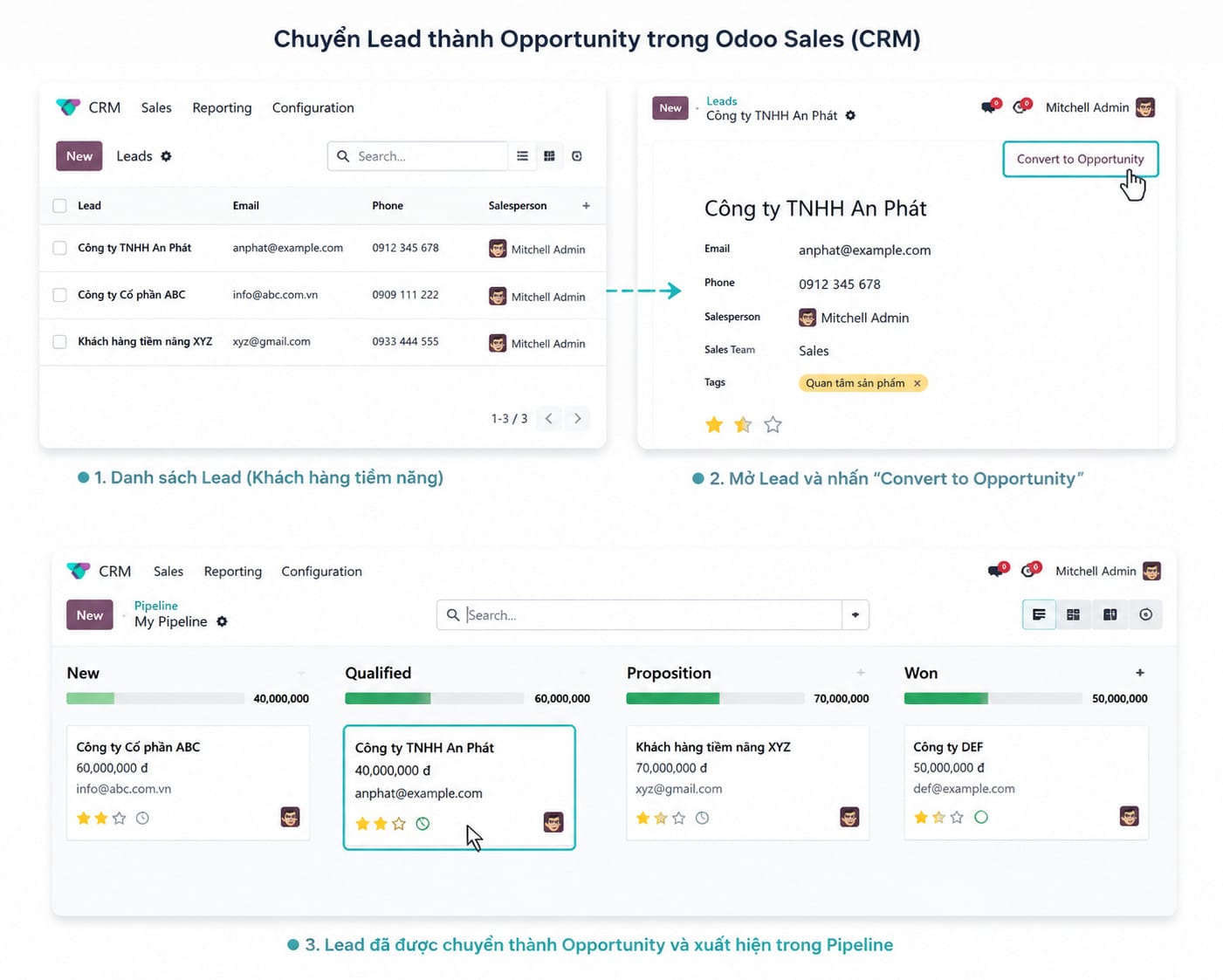
Create Lead
Fill in the quick form, hit Save
Convert
1 click → becomes an Opportunity
Enter Pipeline
Deal appears in Kanban instantly
STEP 3 — 01:30 & 02:00
Drag deals across pipeline stages & set automatic follow-ups
01:30 – Dragging deals across stages
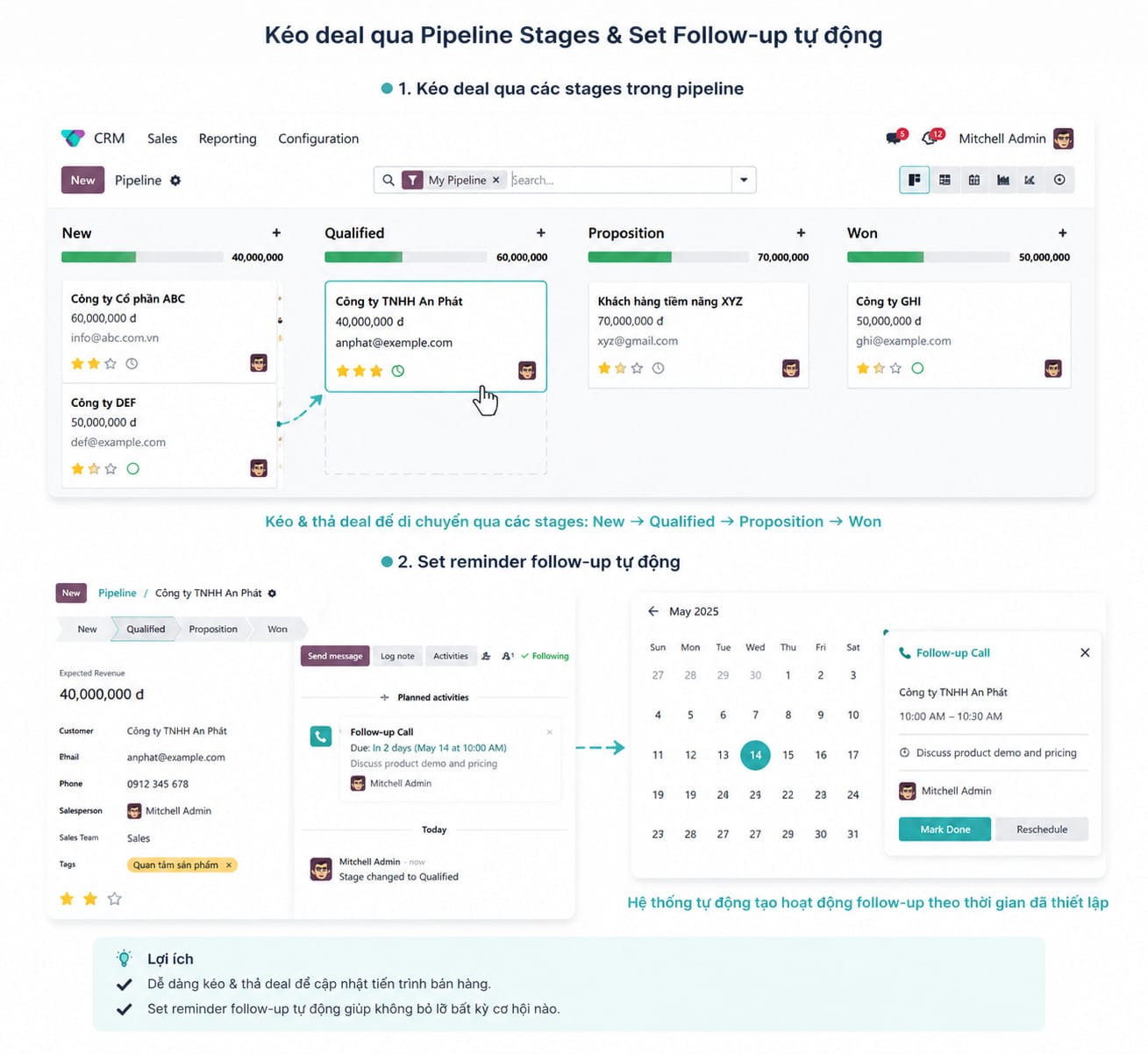
The Kanban view of the Odoo pipeline displays columns by stage: New → Qualified → Proposition → Won. You simply drag and drop a deal card from one column to another as the deal progresses — Odoo automatically records the timestamp and the person who made the change. If you want to customize stage names to match your company’s own process (for example: ‘Meeting → Quote → Negotiation → Closed’), just edit them directly in the interface with no backend intervention required.
02:00 – Setting automatic follow-up reminders
Open a deal, scroll down to the Activities tab, and click ‘Schedule Activity’. Select the activity type (call, email, meeting), the reminder date and time, and add a note on what needs to be discussed. Odoo will automatically push a notification to the salesperson at exactly the right time — no separate reminder app needed, no sticky notes. This is the feature that Salesforce calls ‘activity management’ and charges for in higher-tier plans, while Odoo includes it out of the box even in the Community edition.
STEP 4 — 02:30
View the pipeline value report — real numbers at your fingertips
Go to CRM → Reporting → Pipeline Analysis: Odoo instantly renders a bar chart or pivot table showing total deal value by stage, by salesperson, or by time period. You can filter by team, by month, or drill down into individual deals with just 1 click — no need to export to Excel, no waiting for the end-of-week report. According to Gartner, businesses using real-time sales analytics achieve quota attainment rates 28% higher than those relying on manual reporting.
| Feature | Odoo CRM (Free) | Manual Google Sheets |
|---|---|---|
| Drag & drop pipeline | ✅ | ❌ |
| Auto reminder follow-up | ✅ | ❌ |
| Real-time pipeline report | ✅ | ❌ (manual updates only) |
SUMMARY
Key Takeaways
| Takeaway | What it means for your business |
|---|---|
| Odoo demo requires no complex setup | SMBs can experience it themselves before committing to implementation |
| Building an Odoo pipeline takes under 3 minutes | Fast onboarding — your sales team can start using it immediately, no lengthy training needed |
| Drag & drop + auto reminders built in | Fewer missed follow-ups, higher deal close rates |
| Real-time reports without Excel | Managers make faster decisions based on live data |
| Odoo CRM scales with ERP | As your company grows, there is no need to switch systems |
Want to see an Odoo demo with real data from your industry?
Comment your industry below — Sonix will prepare a tailored Odoo pipeline demo using real-world data that closely mirrors your actual sales process.
No cost. No commitment. Just 30 minutes to see what Odoo looks like in your industry.
Sonix — Your success is our happiness.
Leave us your comment