

 Tiếng Việt
 日本語
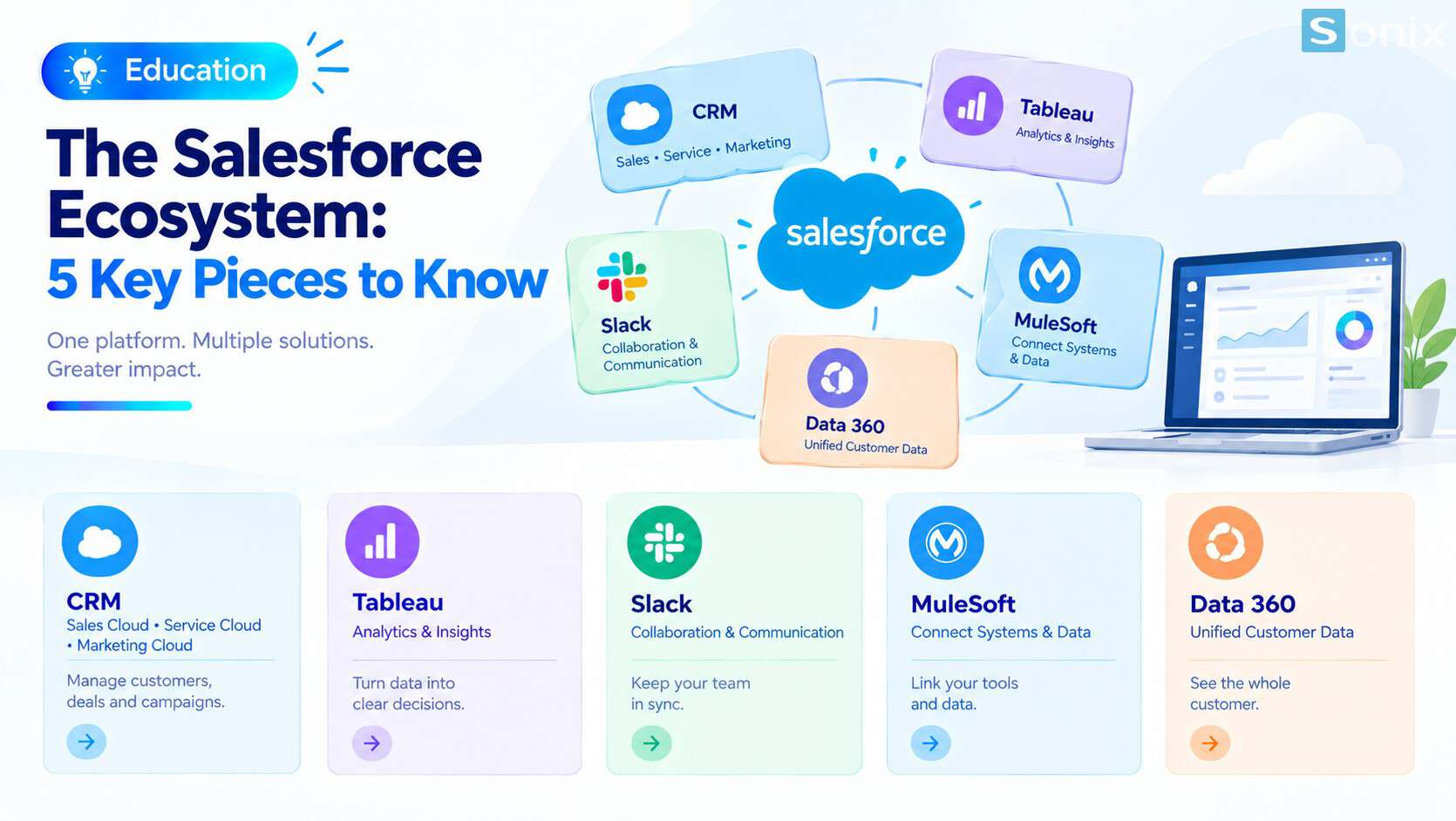
日本語The Salesforce ecosystem is much more than a CRM. Next to Sales Cloud, Service Cloud and Marketing Cloud, you will hear about Tableau for analytics, Slack for team communication, MuleSoft for connecting systems and Data 360 for unifying customer data. With so many names, a fair question from any business owner is: do we need all of them to get value?
The short answer: no. Each piece solves a different problem. Most small and mid-sized companies start with CRM and add another piece only when they hit a real bottleneck, such as reports that must be stitched together from several sources, or systems that cannot talk to each other.
Important note: the office equipment distributor in this article is a hypothetical example, not a real customer. Each product has its own license and pricing, and features depend on edition. Salesforce renames products fairly often (Data Cloud is now called Data 360, for example), so check the official pages before making a decision.
Why so many names feel confusing
Salesforce has grown by building new products and by acquiring specialist companies. Tableau, Slack and MuleSoft were all independent companies before joining Salesforce. That is why each one still has its own name, its own interface and sometimes its own website, and why newcomers often assume they are unrelated tools.
Names also change quickly. Data Cloud is now Data 360. AI agents are grouped under Agentforce 360. An older app that linked Salesforce and Slack has been retired in favor of newer integrations. If you read old and new documentation side by side, feeling lost is natural.
The easiest way to cut through it is to ask: which business question does each piece answer? Once every product is tied to a question, the picture becomes much clearer.
A 5-piece map of the Salesforce ecosystem
These are the five pieces a growing business should be able to name and place. Each one comes with the business question it helps answer.
CRM: Sales Cloud, Service Cloud, Marketing Cloud
- Question: where is each customer in the journey, who owns them, and which deals are about to close?
- Where your team works every day with Leads, Opportunities, Cases and campaigns
- The foundation: every other piece reads from or writes to it
Tableau: analytics and data visualization
- Question: why did revenue in one region drop, and which products are most profitable once sales and finance data are combined?
- Strongest when you need to blend several sources and analyze in depth, beyond the built-in Reports & Dashboards
- The newer direction is agent-assisted analytics; see Tableau Next on the Salesforce site
Slack: where the team talks and gets updates
- Question: how does the whole team know immediately when a big deal moves, without waiting for a meeting?
- Topic-based channels that can be tied to Salesforce records, so conversations stay around one customer or one deal
- Setup guide: Slack Help on Salesforce channels
MuleSoft: the integration layer
- Question: how can CRM, ERP, inventory and the website exchange data without wiring every pair directly?
- Central management of integrations and APIs, built around the MuleSoft Anypoint Platform
- Current product list: Salesforce integration products
Data 360 (formerly Data Cloud): unified customer data
- Question: are these three records in CRM, the website and the POS actually the same customer?
- Brings data from many sources into one unified customer profile for sales, marketing and AI agents
- Official overview: Salesforce Data 360
On top of these pieces sits the AI agent layer, Agentforce. Agents need clean data from CRM and Data 360 to give the right answers. For more on the AI side, read Einstein AI in Salesforce for sales and marketing.
| Piece | Role | Main users |
|---|---|---|
| CRM | Day-to-day customer work | Sales, service, marketing |
| Tableau | Analytics and visualization | Managers, analysts |
| Slack | Communication and collaboration | The whole team |
| MuleSoft | Connecting systems through APIs | IT, implementation partners |
| Data 360 | Unified customer data | Marketing, analytics, AI |
How the pieces connect: one example
Hypothetical example: a 40-person office equipment distributor that sells to businesses and to retail shops. Let us follow one order through the pieces.
Step 1, CRM. A prospect fills in a web form, a Lead is created and assigned to the rep for the southern region. Once the prospect confirms a need for 50 desk sets, the rep converts the Lead into an Opportunity.
Step 2, Slack. When the deal passes a value threshold and moves to the proposal stage, the team channel gets a notification. The team lead joins the conversation about discounts right away instead of waiting for Monday’s meeting.
Step 3, MuleSoft. The deal is closed won, a sales order is created automatically in the ERP and stock is reserved. Nobody in the warehouse retypes the order.
Step 4, Data 360. The same customer once bought from a retail shop using a different phone number. The profiles are unified, so marketing knows this is a returning customer and does not send a new-customer welcome email.
Step 5, Tableau. At month end, the director opens one dashboard that combines CRM revenue with ERP receivables and sees which deals are closed but not yet paid.
The key point: no company needs all five steps on day one. The example only shows where each piece sits in a familiar workflow.
The Salesforce ecosystem for SMBs: where to start
A sensible order is usually CRM first, then the piece that removes your biggest bottleneck. Use the signals below.
| What you are seeing | Piece to consider |
|---|---|
| Customer data lives in spreadsheets and personal chat apps | CRM, always the first step |
| Deal updates arrive late; you chase people for status | Slack connected to CRM |
| Reports are merged by hand from CRM, finance and inventory | Tableau |
| Several systems, staff re-enter data between them | MuleSoft or a lighter integration tool |
| One customer has many records across channels; you want personalization or AI | Data 360 |
If you only have two or three simple integrations, an off-the-shelf connector may be enough, and MuleSoft can wait. If your reporting is mostly pipeline and sales by rep, the built-in Reports & Dashboards usually cover it. If you are weighing a custom approach, see Build vs buy: in-house CRM or Salesforce, and for common integrations, the top 10 apps integrated with Salesforce (in Vietnamese).
Licensing and naming notes
Each piece is a separate investment. Tableau, Slack, MuleSoft and Data 360 have their own licenses and pricing; none of them comes bundled with CRM. Data 360 also includes usage-based charges, so ask for details before switching anything on.
Names change fast. Check the publication date of anything you read. Older material may call Data 360 “Data Cloud” or describe a Slack app that is no longer supported.
Not every piece needs a large implementation partner. Slack and basic reporting can often be done in-house. MuleSoft and Data 360 usually need experienced help, because the hard part is data design, not the tool.
Learn for free before you buy. Trailhead is Salesforce’s official learning platform. The Salesforce Platform Basics module on Trailhead is a good place to understand the platform before diving into each piece.
Checklist before expanding your Salesforce ecosystem
Before adding any piece beyond CRM, run through this short list.
☐ CRM is used daily and the data is reasonably clean
☐ Your biggest bottleneck is written down in one specific sentence
☐ The bottleneck has been matched against the signals table above
☐ The systems that need to exchange data are listed
☐ License and pricing for the next piece are clear
☐ Product names and features are checked on the official pages
☐ Someone owns the new piece after go-live
This November, Sonix will walk through each piece of the Salesforce ecosystem. Which one would you like to explore first? Leave a comment below and the Sonix team will prioritize based on your answers.
Salesforce CRM
Tableau
Slack
MuleSoft
Data 360
Digital Transformation
SME
Book a session with Sonix to pinpoint your current bottleneck and choose the right piece to invest in first, without buying more than you need.
Sonix: Your success is our happiness.
Leave us your comment