

 Tiếng Việt
 日本語
日本語A resident reports a broken air conditioner on Monday, and by Thursday nobody has replied, because the message got buried among hundreds of others. When residents or tenants keep asking whether their repair tickets have been handled, the cause is usually that requests have no tracking number and no clear owner.
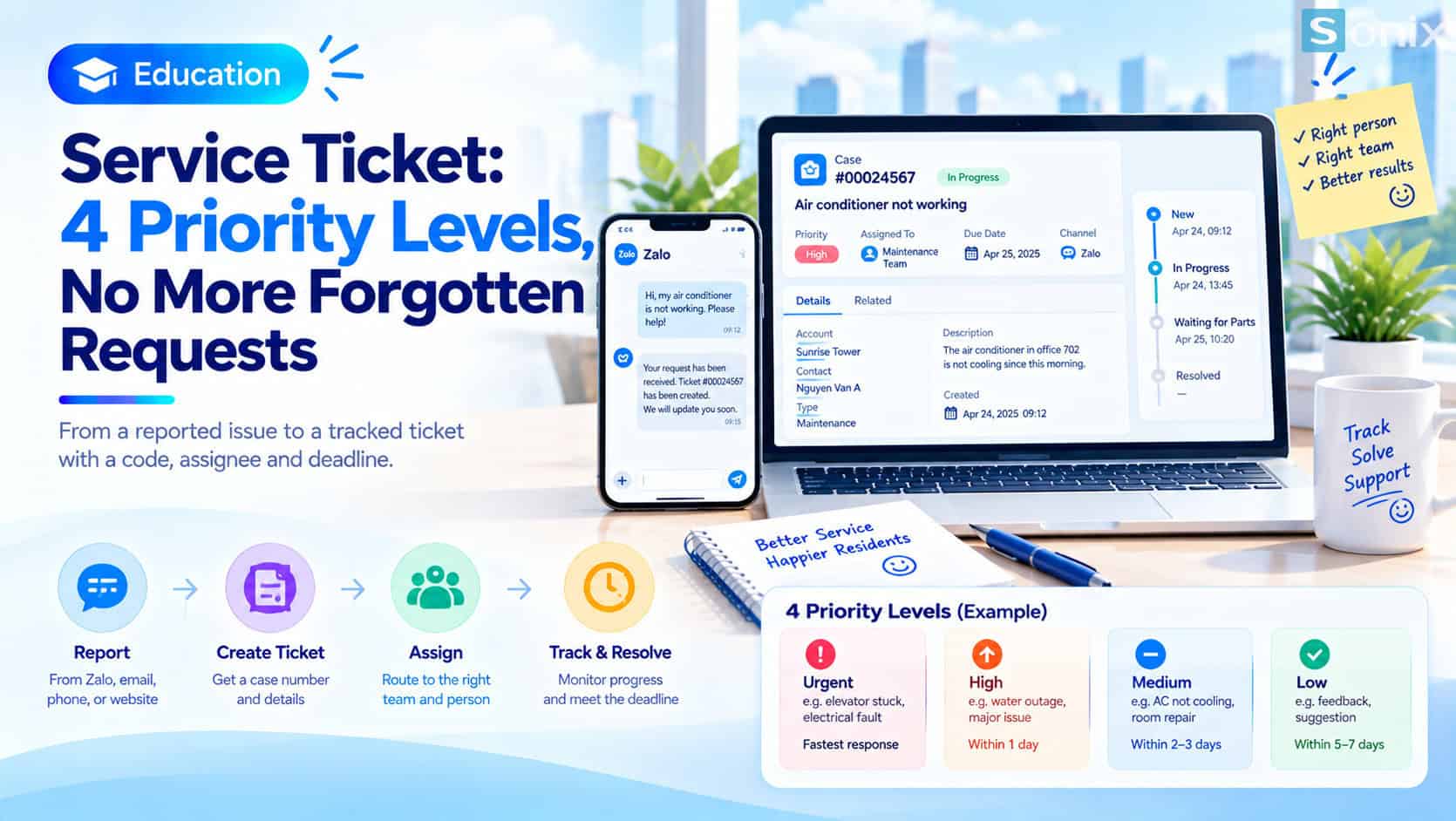
Repair tickets, put simply, are requests recorded as Cases in Salesforce Service Cloud, each with a number, an owner, a status, a priority and a handling deadline. That way both building management and the person who reported the problem know where the request stands.
Important note: the building operator and the priority levels in this article are illustrative assumptions, not an industry standard and not a real customer case. Specific handling deadlines are for each operator to decide. Zalo is not an out-of-the-box channel in a typical setup and needs a separate integration. Features also depend on your edition and license.
 Before and after turning every repair request into a ticket with a number and a deadline.
Why repair requests get lost
Repair requests in a building arrive from several directions at once: Zalo messages to the front desk, emails to management, phone calls to the switchboard, or a word with the security guard. Each channel stores things in its own place, and very few have a number you can look up later.
Three familiar consequences follow. The person who reported the problem does not know whether it was received, so they ask again and again. Management cannot tell which requests are overdue. And when a report is needed, nobody can summarize requests by type or by handling time.
Illustrative example: an office building operator receives requests through Zalo, email and phone. At the end of the week, the head of engineering has to ask each person which jobs are still open, and the list is different every time.
Repair tickets: every request becomes a Case
In Service Cloud, every request is recorded as a Case. A Case is a record that tracks one issue to be resolved for a customer, along with related emails, notes and tasks.
Case number
- Every request gets its own Case number that the reporter and staff can both look up
- The reporter only needs to quote the number when following up
Owner and status
- Every Case has an owner, which can be a person or a queue
- Statuses such as New, In Progress, Waiting for Reply and Closed show progress
Priority
- Every Case has a priority so staff know what to handle first
- Priority is the basis for setting the handling deadline
Handling deadline
- Each priority level is tied to a deadline the operator sets
- The system can warn when a Case is about to be, or already is, overdue
Receiving requests from many channels and routing the work
So that tickets do not depend on someone remembering to key them in, Service Cloud can create Cases automatically from several sources.
Email, web forms and a portal
- Email-to-Case turns emails sent to a support address into Cases
- Web-to-Case creates a Case when someone fills in a form on your website
- A portal (Experience Cloud) lets residents or tenants submit requests and see their progress
Zalo: needs a separate integration
- Zalo is not an out-of-the-box channel in a typical setup
- To create Cases from Zalo, the operator needs a separate integration, so discuss the currently available options with your implementation partner
- Until then, you can steer people to a web form or email to create a ticket
Omni-Channel routes the work
- Omni-Channel assigns Cases to suitable staff based on routing configuration, availability and workload
- Illustrative example: electrical faults go to the electrical team, water faults go to the plumbing team
4 priority levels and handling deadlines: a reference example
Below is a sample set of 4 priority levels for a building operator. You can change the number of levels, their names and the deadlines, because every building has its own characteristics and service commitments.
| Priority | Example incident | Suggested handling |
|---|---|---|
| Urgent | Person trapped in a lift, electrical leakage | Alert the on-duty person at once, handle immediately, shortest deadline |
| High | Water outage in one area | Assign within the shift, update progress often |
| Medium | Air conditioner not cooling | Schedule in order of receipt, report back once a slot is set |
| Low | Feedback, suggestions | Record and reply on a set cycle |
The table deliberately gives no specific hours or days: the operator decides each level’s deadline based on staffing, tenant contracts and level of risk.
Deadlines and warnings. To have the system track deadlines, Service Cloud offers Entitlements and Milestones. An entitlement describes the level of support a customer is entitled to, while milestones are the time targets to meet, for example first response and completion. When a milestone is about to be, or already is, overdue, the system can raise an alert or escalate the Case through an escalation rule.
For urgent incidents, a ticket does not replace the safety procedure. A trapped person or an electrical leak still needs an immediate call to the on-duty team or the emergency number; the ticket is for recording and tracking.
Notes for applying this to your own operation
Start with few priority levels. Too many levels make it hard for staff to choose and the priority loses its meaning. Settle each level’s deadline with the operations team first, then configure.
Entitlements are not attached to every Case automatically. According to guidance material, entitlements do not automatically apply to Cases created from web-to-case, so plan how a support level gets attached to each Case from the start.
Classify Cases clearly. You can separate repair requests from feedback with record types so each has its own screen and process. Salesforce Record Types: Start With 2 for a Cleaner Screen explains how.
Once everything runs smoothly. You can look at AI tools for writing Case comments in Salesforce Winter 27: 5 Easy-to-Grasp Changes That Matter, depending on edition and license. For a broader view of what AI can do, see Einstein AI in Salesforce: What Can AI Actually Do for Your Sales & Marketing Team?.
Measure. After a few weeks, look at reports of Cases by type and by handling time to see where the bottleneck is.
Checklist before building your ticket system
Before configuring anything, run through this short list to make sure tickets reflect how your operation actually works.
☐ Listed the current request channels (Zalo, email, phone, in person)
☐ Chose the channels that create Cases automatically: email, web form, portal
☐ Discussed integration options if requests should come from Zalo
☐ Settled the number of priority levels and example incidents for each
☐ Settled each level’s deadline with the operations team
☐ Configured routing and warnings for Cases nearing their deadline
☐ Kept a direct-call procedure for urgent incidents alongside the ticket
Are your requests tracked by number or by memory? Leave a comment below, the Sonix team would love to hear how you work.
Salesforce Service Cloud
Customer Experience
Digital Transformation
SME
How-to
Smart Building
Building Management
Book a consultation with Sonix to review how requests are received and design tickets and priority levels that fit your operation.
Sonix: Your success is our happiness.
Leave us your comment