

 Tiếng Việt
 日本語
日本語The second most common question Sonix receives after “how much does it cost?” is: “Can this CRM connect to the software I am currently using?” And the answer often surprises people, not because it can’t connect, but because Salesforce integrates apps almost limitlessly. The issue is just knowing how, and when you need an extra layer of middleware.
This article compiles the top 10 apps that Vietnamese SMBs connect with Salesforce the most: from Gmail, Zalo, and MISA to Odoo and Facebook Lead Ads, along with practical, real-world methods rather than just theory.
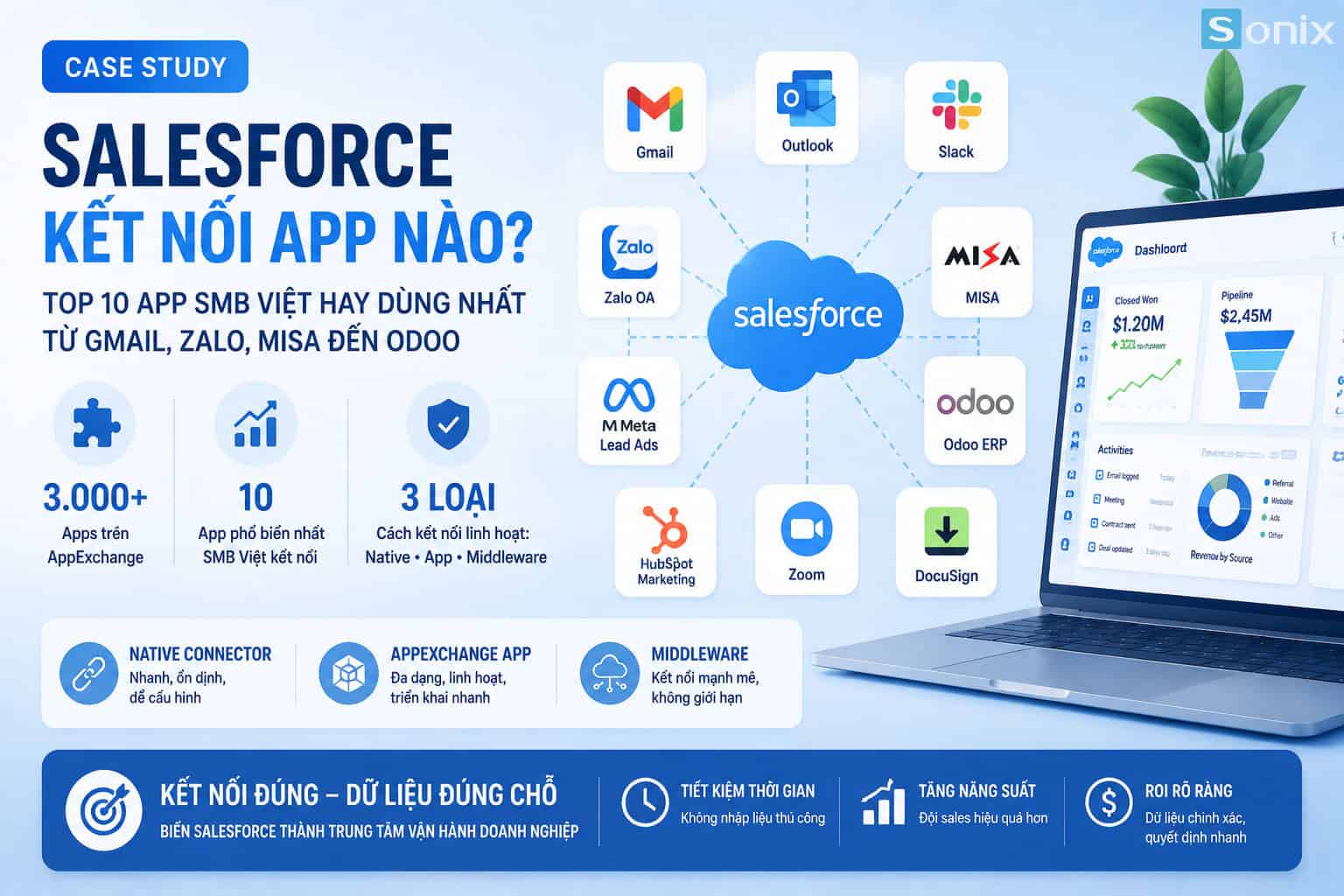 What apps does Salesforce integrate with? Top 10 most used software by Vietnamese SMBs: from Gmail to Zalo, MISA, and Odoo
Table of Contents
A standalone CRM is just a storage repository. But when this platform connects to email, accounting, marketing, and inventory, it truly becomes the central nervous system of your business. That is why integrating apps with Salesforce is just as critical as setting up the initial pipeline.
Background
Why is integrating apps with Salesforce crucial for Vietnamese SMBs?
A typical Vietnamese SMB operates on at least 5 to 7 different software platforms simultaneously: Gmail or Outlook for email, Zalo for internal and customer communication, MISA or FAST for accounting, Facebook Ads for marketing, and perhaps Odoo or an internal warehouse management system. Each system is an isolated “information island”.
The practical consequence: the sales team has to manually enter data from Facebook into the CRM, accounting doesn’t know which deals are signed to issue invoices, and managers have to compile reports from 3 sources every week. This is not a human issue; this is a broken data architecture issue.
Connecting these apps via the CRM solves this problem: data from all sources flows into one place, is processed and distributed to the right place at the right time, without manual intervention. According to the Salesforce State of Sales Report, businesses integrating their CRM with at least 3 systems see 27% higher sales team productivity than those using a standalone CRM.
Top 10 Apps
Top 10 apps Vietnamese SMBs frequently connect with Salesforce
The list below is based on Sonix’s practical deployment experience, not a ranking from the homepage. Each app is grouped by function to easily match your business needs.
Email & Communication Group: Integrating Communication Apps
Gmail / Google Workspace
Connect via Einstein Activity Capture. All email exchanges with customers are automatically logged into the corresponding Opportunity. Sales reps do not need to copy and paste, and managers can look into the CRM and see the full communication history without asking anyone.
Connection method: Native connector, installs in 15 minutes. See instructions on Salesforce Help.
Microsoft Outlook / Office 365
For businesses using the Microsoft ecosystem. The Salesforce for Outlook plugin allows you to create Leads, log emails, and view CRM information right inside the Outlook interface. No need to switch tabs or lose context mid-task.
Connection method: Native connector via AppExchange. Supports both Outlook desktop and Outlook Web.
Slack
Since Salesforce acquired Slack in 2021, this is the deepest integration on the list. Deal updates, new tasks, or stale deal alerts from Flow push automated notifications right to your team’s channel. The CRM reports for you instead of waiting for someone to remember to check.
Connection method: Built-in to the platform. Configured via the Slack App Directory.
Vietnamese Software Group: Connecting Zalo and MISA
Zalo Business / Zalo OA
“Can Salesforce connect to Zalo?” is the question Sonix receives the most. Yes, but via API, not a native connector. Zalo API combined with middleware like Make or custom API callouts makes this possible. When a customer messages the OA, a lead is auto-created in the CRM; when sales updates a stage, a template message is automatically sent via Zalo.
Connection method: Zalo API + middleware or custom Apex callout. Requires about 1 to 2 days of dev time to set up properly.
MISA / FAST Accounting
The classic scenario: a deal is Closed Won in the CRM but accounting does not know to issue the invoice. Connecting MISA with the sales platform solves this. When an Opportunity moves to Closed Won, contract information automatically syncs to the accounting software to create an order and record the receivable.
Connection method: Via middleware like Make or Zapier. MISA does not have a native connector yet, so careful field mapping between the two systems is required.
Marketing & Lead Generation Group
Facebook / Meta Lead Ads
One of the integrations with the clearest ROI. When a customer fills out a form on Facebook Lead Ads, the lead is auto-created in the CRM within seconds. No CSV exports, no manual entry. Sales get notified instantly and can call back in 5 minutes. Research from Harvard Business Review shows that calling back within 5 minutes increases the connection rate 100 times compared to calling after 30 minutes.
Connection method: Via Zapier or Make. Setup takes under 30 minutes, no dev needed.
HubSpot Marketing (running in parallel)
Some SMBs choose a hybrid model: HubSpot handles inbound marketing and email nurturing, while Salesforce CRM handles the sales pipeline and forecasting. The two systems sync two-way via a native connector. Qualified leads from HubSpot auto-convert into Opportunities, and deal updates sync back to trigger post-sale email sequences.
Connection method: Native connector available on both platforms. Two-way real-time sync.
Operations & ERP Group: Connecting Odoo and Inventory Systems
Odoo ERP
The stack Sonix deploys most for scaling SMBs: Salesforce as the CRM and Odoo as the ERP. The sales platform manages the pipeline and customers; Odoo manages inventory, production, and accounting. When a deal is Closed Won, a Sales Order is auto-created in Odoo, inventory is dispatched, and accounting records it. No re-entry anywhere.
Connection method: Via the Odoo Connector on AppExchange or custom API. Sonix deploys both platforms and often builds custom connectors based on each client’s specific workflow.
Zoom: Automatic Call Logging
For hybrid sales teams, every Zoom meeting is automatically logged into the Opportunity’s Activity History, including duration, participants, and the recording link. Sales do not need to take notes after every call, and managers see the full interaction history right in the CRM.
Connection method: Zoom for Salesforce on AppExchange. Installed and configured in about 20 minutes.
DocuSign: E-signatures right inside the CRM
Signing contracts is often where deals stall the most: printing, scanning, emailing, waiting for manual signatures. Connecting DocuSign allows sales to send contracts for e-signature directly from the Opportunity interface. Once signed, the Opportunity auto-moves to Closed Won and the contract is attached to the customer record. Legally compliant in Vietnam under the 2023 Law on Electronic Transactions.
Connection method: DocuSign for Salesforce on AppExchange. Native, no middleware required.
5 minutes
Time it takes for a Facebook lead to appear in the CRM after connecting, instead of 24 hours of manual entry
15 minutes
Setup time for Gmail or Zoom. No dev needed, no middleware
0 times
Manual data entry between systems after a proper connection. Data flows exactly where it needs to
Connection Techniques
When do you need middleware? When can Salesforce connect directly?
Not every app needs a complex middle layer. Understanding the 3 connection types helps you estimate costs and setup time before starting:
| Connection Type | Examples | Cost & Time | Best For |
|---|---|---|---|
| Native Connector | Gmail, Outlook, Slack, Zoom, DocuSign | 15 to 45 minutes, no extra cost beyond the license | App is within the AppExchange ecosystem |
| Middleware (Zapier / Make) | Facebook Lead Ads, MISA, Zalo OA | 30 minutes to 2 days; ~$20 to $100/month for middleware fees | Need quick connection, simple logic, no coding |
| Custom API / Apex | Odoo, internal warehouse software, legacy systems | 1 to 4 weeks of dev; one-time cost, no monthly fees | Complex business logic, large volume, need deep syncing |
Selection Guide
Choose the right integration based on your real pain points
The rule Sonix always recommends: start with the connection that solves your biggest current pain point, not the one that sounds the most impressive. The table below helps you narrow it down quickly:
| If your biggest pain point is… | Priority Connection |
|---|---|
| Facebook leads enter the CRM slowly, manual entry takes hours | Facebook Lead Ads → Salesforce (Zapier/Make) |
| Email history isn’t in the CRM, you have to search personal inboxes | Gmail / Outlook → Salesforce (Native) |
| Deal is signed but accounting doesn’t know to issue the invoice | Salesforce → MISA/FAST (Middleware) |
| Customers message on Zalo but sales must log it manually | Zalo OA → Salesforce (Zalo API + Middleware) |
| CRM and ERP/inventory can’t talk, dual data entry | Salesforce + Odoo (Custom API) |
| Manual signing is slow, deals stall at the last step | DocuSign → Salesforce (AppExchange Native) |
“When Salesforce integrates apps correctly, it is no longer just a CRM. It becomes the operational hub for the entire business. Data from marketing, sales, accounting, and inventory flows into one place, automatically. That is when ROI truly starts to appear.”
Salesforce Zalo
Salesforce MISA
Salesforce Odoo
AppExchange
SMB Digital Transformation
Sonix Vietnam
What tools are you using that you want to connect with Salesforce?
Every business has a different software stack, and each connection needs to be designed according to actual workflows. Sonix has experience deploying both Salesforce and Odoo and will advise on the best connection method for your current system.
🔗 Free Integration Architecture Consultation
Sonix analyzes your current stack, identifies data leaks, and recommends a suitable integration roadmap: from native connectors to custom APIs.
Sonix – Your success is our happiness.
Leave us your comment