

 Tiếng Việt
 日本語
What is MuleSoft? It is Salesforce’s integration and API management platform, acting as a middle layer so the systems in a business connect through centrally managed APIs instead of wiring directly to each other. Picture 5 systems, each connected straight to all the others: 10 connections. Change 1 system and you have to check and fix 4 places.
The short answer: a middle layer means replacing one system affects the others less, you can see how data flows, and you can reuse connections you have already built. But to be straight with you: for 2–3 simple integrations this can be overkill. A ready-made connector or a lightweight middleware is often enough.
Important note: the office equipment distributor with 5 systems below is a hypothetical example, not a real customer. The platform has its own license, features and cost depend on your subscription, and product names can change between releases. Cost and solution-choice content is general reference, not advice, so check the official documentation and a real quote.
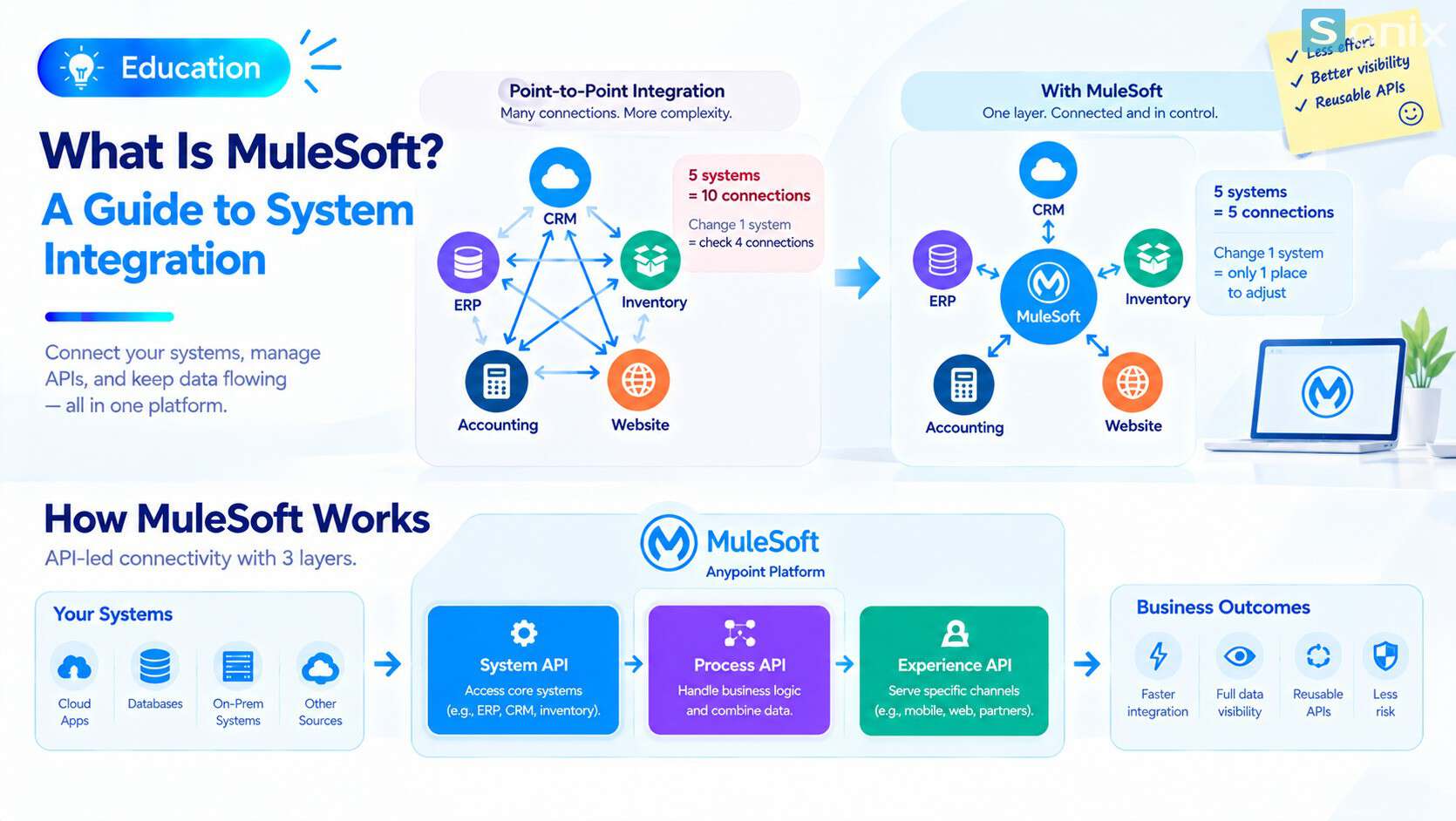 Before: systems wired across like a spider web. After: every system connects to one integration layer in the middle.
Why point-to-point integration turns into a spider web
Point-to-point integration is the most natural approach: if two systems need to talk, connect them directly. With two or three systems it is quick and tidy. The trouble starts as the number of systems grows. Each new system may need to connect to every existing one, so connections grow much faster than systems. If n systems are fully cross-connected, you get n×(n−1)÷2 connections.
| Systems | Connections | Places to check when 1 system changes |
|---|---|---|
| 3 | 3 | 2 |
| 5 | 10 | 4 |
| 8 | 28 | 7 |
| 10 | 45 | 9 |
This is the fully cross-connected case. Real setups may have fewer, but the trend is the same.
Hypothetical example: an office equipment distributor runs 5 systems: CRM, ERP, warehouse, web store and accounting. When the ERP is upgraded and its data structure changes, the other four connections all need checking and fixing.
One change, many breaks. Each connection was written separately, so there is no quick way to know what a change will affect.
Nobody holds the whole picture. Knowledge sits with whoever built each connection. When they leave or move teams, it leaves with them.
Errors are hard to trace. Data is wrong in one place, but nobody knows where it travelled through.
What is MuleSoft and how does it work
MuleSoft is an integration and API management platform, part of Salesforce since 2018. Its main product is Anypoint Platform. Although Salesforce owns it, the platform is not only for Salesforce: it is used to connect many kinds of systems such as ERP, databases and cloud apps.
Instead of cross-connecting, systems connect to a middle layer through centrally managed APIs. MuleSoft calls this API-led connectivity, and it splits connections into three layers:
System APIs
- Access core systems such as the ERP, CRM and warehouse
- Hide each system’s technical details so the rest does not need to know them
Process APIs
- Handle business logic and combine data from several System APIs
- Hypothetical example: an order Process API pulls customer data from the CRM, stock from the warehouse and prices from the ERP
Experience APIs
- Serve a specific channel such as a mobile app, website or partner
- A new interface or channel only needs changes in this layer
Thanks to the layers, a change in one layer affects the others less, and APIs you have built can be reused across projects. To learn more, see this Trailhead module on connecting external data and this quick start guide to MuleSoft for Salesforce developers.
Point-to-point vs a middle integration layer
The table below compares the two approaches at a high level. It is not about which is better, but which fits your scale.
| Criteria | Point-to-point | Middle integration layer |
|---|---|---|
| Number of connections | Grows fast with each system | Each system connects once to the middle layer |
| When a system changes | Many connections to fix | Mostly changes in that system’s layer |
| Visibility of data flow | Scattered, each connection its own way | Central, you can see the whole picture |
| Reuse | Low, each connection written separately | High, built APIs can be reused |
| Upfront cost | Low for a few connections | Higher, needs design and a license |
| Best when | 2–3 simple integrations | Many systems, frequent changes |
When you need it and when you do not
A straight word: this is not the answer to every integration problem. The signs below are rough guides, not fixed thresholds.
Around 5 or more systems that need to exchange data. The number of connections becomes hard to hold in your head.
Systems change often. ERP upgrades, switching vendors or adding a sales channel all mean fixing connections.
You need to see the whole data flow. You want to know where data goes and where it fails, not only hear about it when someone complains.
Many apps use the same data source. Build once, reuse many times pays off.
On the other hand, for 2–3 simple integrations, try the systems’ ready-made connectors or a lightweight middleware first. You can step up once the need truly grows.
If your main goal is a unified customer profile across systems, read our article Data 360: 4 steps to unify customer data. To see why clean data decides the quality of every integration, read Einstein AI in Salesforce for sales and marketing. Related solutions are on the Sonix Salesforce page (in Vietnamese).
What to ask before you decide
How many systems are there, and how do they change? Draw the current picture first. Many businesses are surprised by their real number of connections.
Who designs and maintains it? An integration layer needs people who understand APIs and governance. Decide between an in-house team and an implementation partner.
License and cost. The platform has its own license and is not included with a CRM license. Ask for a quote based on your real needs. This is general reference, not financial advice.
Where does sensitive data travel? Be clear on permissions, logging and storage, especially for customer and financial data.
What is MuleSoft for your business? A decision checklist
Before talking to an implementation partner, run through this short list.
☐ Drew a map of your current systems and the connections between them
☐ Counted the point-to-point connections and noted who maintains each
☐ Listed systems that will change or be upgraded in the next 12 months
☐ Checked whether the systems’ ready-made connectors already meet the need
☐ Decided which data flows need monitoring and error alerts
☐ Decided who will design, run and maintain the integration layer
☐ Asked for a quote based on real needs before deciding
How many systems in your company need to talk to each other? Leave the number in the comments and the Sonix team will suggest a sensible place to start.
MuleSoft
Salesforce Implementation
ERP System
Digital Transformation
Book a consultation with Sonix to redraw your current systems map and decide between ready-made connectors and a dedicated integration layer, before you invest.
Sonix: Your success is our happiness.
Leave us your comment