

 Tiếng Việt
 日本語
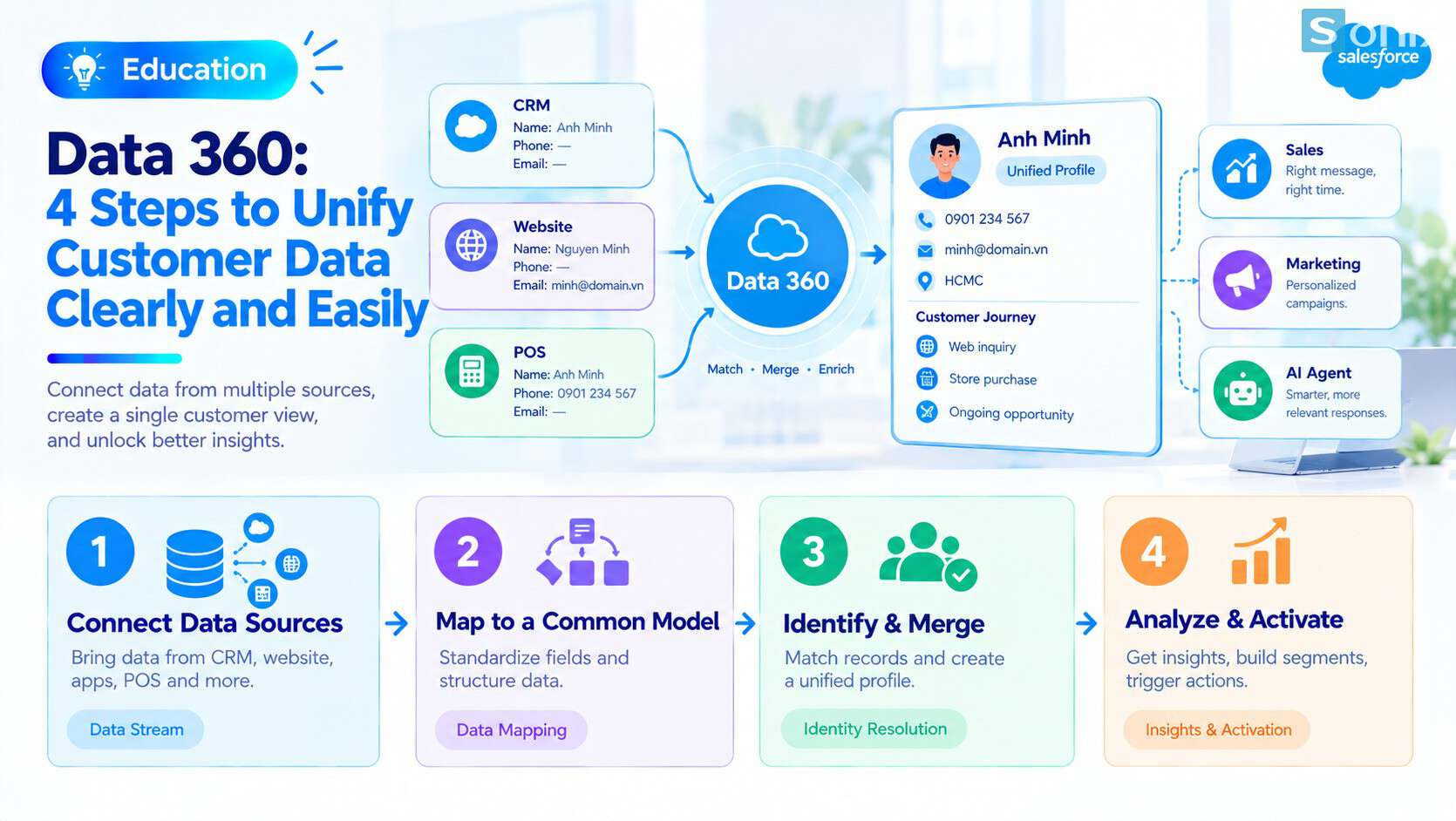
Data 360 is Salesforce’s data platform, formerly called Data Cloud, built to bring customer data scattered across many systems into one unified profile. Picture a single customer: your CRM says Mr. Minh, the website holds an email address, the point-of-sale system has a phone number. Three records, and nobody knows they are the same person.
The short answer: Data 360 connects your data sources, maps them to a common model, recognizes records that belong to the same person, and builds a unified profile that sales, marketing and AI agents can all use. It does not replace your CRM. The CRM is where people work; this is the data layer underneath.
Important note: the office equipment retailer and the customer records in this article are hypothetical, not real data. The platform has its own license and pricing, features depend on your subscription, and menu names may differ by version. The pricing section is general information, not financial advice.
Why customer data ends up scattered
The more channels a business sells through, the more its customer data gets split up. Sales logs in the CRM, the website stores accounts, stores record purchases at the till, and support chats through messaging apps. Each system holds one piece, and each piece records names, phone numbers and emails in its own way.
The consequences are concrete. A customer who bought in store yesterday still gets an ad for the same product today. Marketing counts 10,000 customers when there are really 7,000 people. A rep calls a key account without knowing the customer just complained to support.
| Before unifying | After unifying | |
|---|---|---|
| Customer records | Several disconnected records per person | One unified profile, traceable to each source |
| Customer count | Duplicates inflate the numbers | Counted by real people |
| Messaging | Same content for everyone | By segment, based on real behavior |
| AI agents | Answer from one fragment of data | Have fuller context about the customer |
Data 360 in a nutshell
Salesforce renamed Data Cloud to Data 360 in October 2025 as part of the Agentforce 360 lineup. According to the official Salesforce product page, it is a real-time data platform that combines data from many sources into one customer profile, giving both people and AI agents the context they need.
Three points set it apart from familiar tools:
It is not a CRM. The CRM is where people create Leads, update Opportunities and work Cases. Data 360 sits behind it, collecting and enriching data, then sending results back to the CRM and other channels.
It is not a reporting tool. It prepares clean, unified data. Analysis and visualization belong to CRM reports or Tableau. If you are weighing Tableau, read What is Tableau and how it differs from Salesforce reports.
It does not alter source data. The unified profile is created alongside the original records, and every value can be traced back to where it came from.
4 steps Data 360 uses to unify customer data
The process boils down to four steps. Screen labels may vary slightly, but the logic stays the same.
Connect your sources (data streams)
- Bring in data from CRM, the website, apps, cloud storage or other systems through connectors and APIs
- Each incoming feed is called a data stream
Map to a common model (data mapping)
- Every source names fields differently: phone, mobile, tel. This step maps them all to one data model
- Salesforce calls the objects in this model Data Model Objects (DMOs)
Recognize and merge (identity resolution)
- Match rules decide when two records are the same person, for example the same email, or a similar name plus the same normalized phone number
- Reconciliation rules decide which value wins when sources disagree: by frequency, by most recent, or by source priority
Analyze, segment and activate
- Calculate metrics such as total spend or days since last purchase (insights)
- Build segments and send them to Marketing Cloud, the CRM or AI agents to act on
You can try step 3 hands-on in the Unify Your Data project on Trailhead, which walks through configuring match and reconciliation rules.
Example: one customer, three records
Hypothetical example: an office equipment retailer with stores, a website and a B2B sales team. The same customer shows up in three places.
| Source | Name | Phone | |
|---|---|---|---|
| CRM | Nguyễn Văn Minh | 0901 234 567 | minh.nguyen@company.vn |
| Website | Nguyen Van Minh | (blank) | minh.nguyen@company.vn |
| POS | Mr. Minh | +84901234567 | (blank) |
A match rule on email links the CRM and website records. A match rule on normalized phone number adds the POS record, because 0901 234 567 and +84901234567 are the same number once spaces are removed and the country code is standardized. A reconciliation rule takes the name from the CRM because it is the priority source. The result: one unified profile with name, phone, email, in-store purchase history and the open deal with sales.
The biggest lesson: standardizing how phone numbers and emails are captured at every touchpoint matters as much as the tool itself. The cleaner the input, the higher the match rate. If you work in retail, see Sonix solutions for retail.
When small and mid-sized businesses should care
Not every company needs Data 360 right away. Use the table below to assess where you stand.
| Situation | Suggestion |
|---|---|
| Customer data mostly in CRM, 1–2 sources | Not yet. Clean your data and use Duplicate Rules in CRM first |
| 3 or more sources: CRM, website, POS, apps | Start considering it, especially for multi-channel retail |
| You want to personalize marketing based on real behavior | A good fit, together with Marketing Cloud |
| You want AI agents to answer customers with full context | A good fit; this is the data foundation for Agentforce |
To understand why clean data decides AI quality, read Einstein AI in Salesforce for sales and marketing. To see where this data layer sits in the bigger picture, see Salesforce Ecosystem: 5 essential pieces.
Pricing and questions to ask first
Unlike CRM licenses priced per user, Data 360 is priced by usage. According to the official Salesforce pricing page at the time of writing, the unit is Flex Credits consumed per action, there are plans based on the number of customer profiles, and bringing data in is listed as free. Pricing can change, so check the official page. This is general information, not financial advice.
Questions worth asking before you switch anything on:
Which actions consume the most credits? Querying, real-time processing and unstructured data processing are consumed differently. Ask with your specific use case in mind.
Is there a usage monitoring tool? Know who watches consumption and who gets alerted when it spikes.
Which data really needs to come in? Only bring in data that serves a specific use case. Skip real-time refresh if a daily update is enough.
Is there a trial? The pricing page mentions a trial with limited storage and credits for Salesforce customers. It is a good way to measure real usage before committing.
Checklist before implementing Data 360
Before talking to an implementation partner, run through this short list.
☐ You have listed your current customer data sources
☐ You have picked a shared key for matching, such as email or phone
☐ Phone and email are captured the same way at every touchpoint
☐ You have chosen a priority source for when sources conflict
☐ You have written down 1–2 specific use cases instead of doing everything at once
☐ You understand how credits are consumed and how usage is monitored
☐ Someone owns data quality after go-live
How many places does your customer data live in today? Leave the number in the comments and the Sonix team will suggest a sensible starting point.
Data 360
Data Analytics
Digital Transformation
Business
Book a session with Sonix to review your current data sources and find the right starting point before investing in a data platform.
Sonix: Your success is our happiness.
Leave us your comment