

 Tiếng Việt
 日本語
日本語This month’s forecast is VND 5 billion. But which deals are at risk of slipping, and why? Pipeline Forecasting in Salesforce Winter 27 gains information to answer exactly that: deal risk, methodology scores, contact insights, agent activity and an activity heatmap, right on the forecast screen.
The short answer for a sales manager: start with large deals that carry a risk alert, ask the owner about the most recent activity instead of only the number, and use the methodology score to see which step a deal is still missing.
Important note: the figure of VND 5 billion in this article is an illustrative assumption, not real data. The feature depends on edition and license, and activity information must be recorded fully to be useful. Menu names may differ by version, so check the official Salesforce release notes.
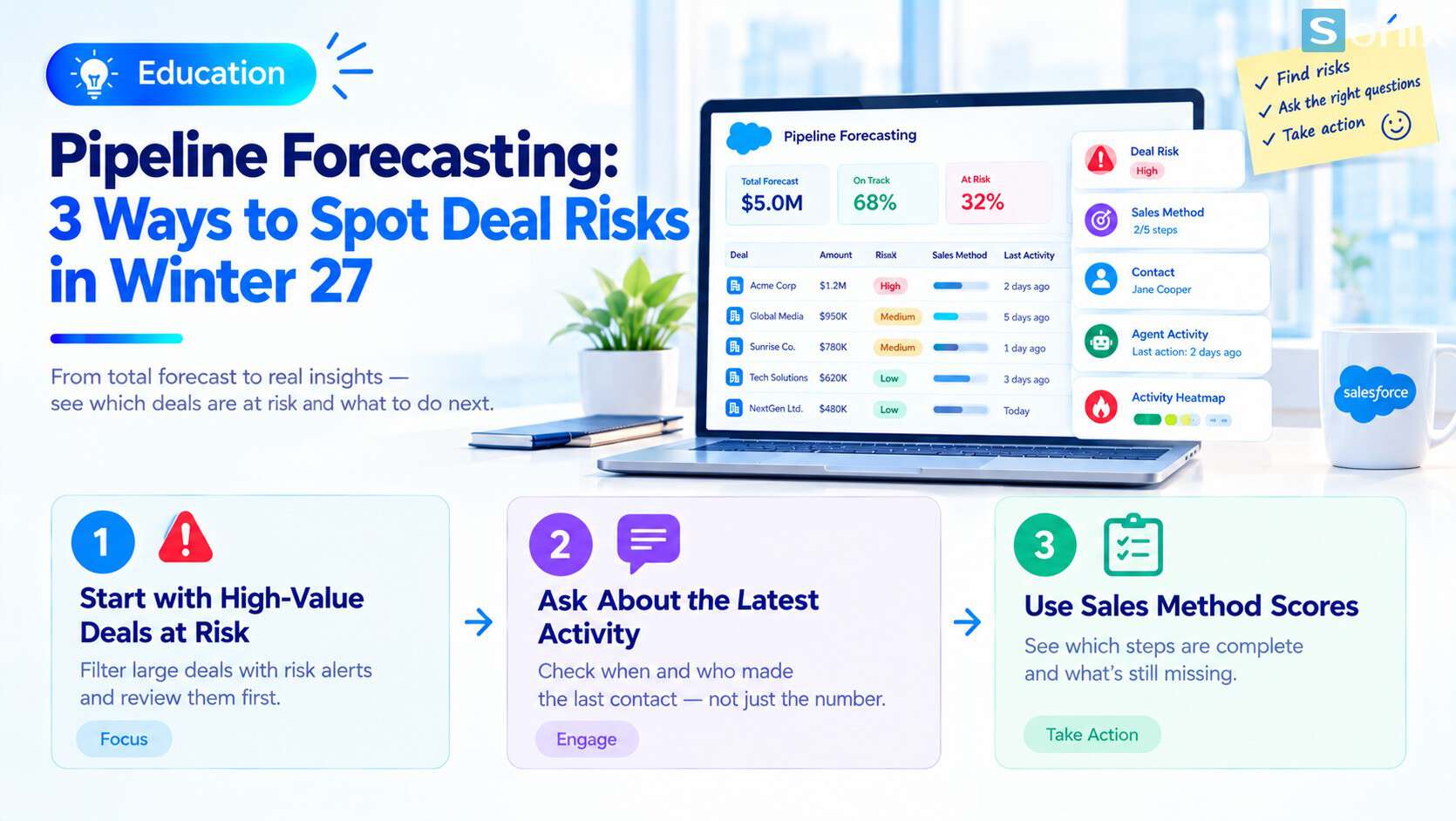 How to read deal risk in Pipeline Forecasting.
Why knowing the forecast number is not enough
Sales managers usually know the forecast number, but not which deals are at risk and why. The number gives the total, while the decisions sit at deal level: who to call back, what to ask, which deal to prioritize.
Without deal-level information, a pipeline meeting easily becomes a reading of the number. Everyone reports from memory, and deals that have gone quiet are only noticed once the forecast has already changed.
Pipeline Forecasting in Winter 27 puts these extra layers of information exactly where the manager is already looking at the forecast, so there is less need to open each record to piece the picture together.
What Winter 27 adds to Pipeline Forecasting
According to the Salesforce release notes, reps and managers can review deal risks, methodology scores and contact insights right in the pipeline screen, along with new columns for agent activity, deal risk alerts and activity heatmaps.
| Information | What it tells you | How to use it in the meeting |
|---|---|---|
| Deal risk alerts | Which deals show signs of trouble | Pick the deals to discuss first |
| Methodology score | Which steps a deal has completed and which are missing | Ask about the missing step |
| Contact insights | Who is involved in the deal | Check whether a deal rests on one person or several |
| Activity heatmap | How much recent engagement each deal has | Spot deals that have gone quiet |
| Agent activity | What an agent has done on the deal | See whether the agent is helping or needs a person to step in |
One public source says standard forecasting functionality has been consolidated into Pipeline Forecasting. Check the release notes to see exactly what your org shows, because what appears depends on edition and license.
3 ways to read deal risk in the pipeline meeting
Start with large deals that carry a risk alert
- Filter to large deals with a risk alert, since a slip there affects the forecast most
- Spend meeting time on these first; small, healthy deals can wait
Ask the owner about the most recent activity
- Instead of asking “when will this close”, ask when the last contact was and with whom
- Compare the answer with the activity heatmap to see at once how long the deal has been quiet
Use the methodology score to see what a deal is missing
- See which steps of the sales methodology your team uses the deal has completed
- Turn the missing step into a concrete task for the owner, for example meeting one more decision maker
Illustrative example: a weekly pipeline meeting
Illustrative example: an office equipment distributor has a monthly forecast of VND 5 billion. The sales manager opens the Pipeline Forecasting screen before the meeting. The VND 5 billion figure and the deals in this example are all assumptions for demonstration.
| The old way of meeting | Meeting with Pipeline Forecasting | |
|---|---|---|
| Opening | Read the forecast number back | Open the large deals that carry a risk alert |
| Main question | When will it close? | When was the last contact, and with whom? |
| Information used | Each person’s verbal report | Risk alerts and the activity heatmap |
| Outcome | A list of deals, few concrete actions | A concrete action for each risky deal |
What changes is the question: from “what is the number” to “which deal has a problem and who does what next”. This illustrates a way of running the meeting; there are no figures from real customers.
Notes on edition, data and how to use it
Edition and license matter. Not every org sees all of these columns. Check the release notes and your plan before promising anything to the team. AI features may need a separate license; see Einstein AI in Salesforce: What Can AI Actually Do for Your Sales & Marketing Team?.
Activity data must be complete. The heatmap is only accurate when staff log calls, emails and meetings. If activity is not recorded, a deal can look quiet even though work is going on.
A risk alert is a prompt, not a verdict. Use it to ask questions, not to reach conclusions. The deal owner still understands the context best.
Do not use it to assign blame. If staff fear being scored, they will stop logging activity and the data loses its value.
Start from the foundation. If your team does not yet review the pipeline regularly, begin with CRM Reports: 3 Simple Must-Have Reports to Start With, and see the other changes in this release in Salesforce Winter 27: 5 Easy-to-Grasp Changes That Matter.
Checklist for the pipeline meeting
Before your next meeting, run through this short list to make sure you are using Pipeline Forecasting well.
☐ Checked the release notes to see which columns my org shows
☐ Checked edition and license
☐ Agreed that the team logs calls, emails and meetings
☐ Prepared the meeting in order: large deals with risk alerts first
☐ Changed the question from the number to the most recent activity
☐ Turned each missing step into a concrete task per deal
☐ Explained to the team that alerts are prompts, not scoring
Does your pipeline meeting discuss the number or the deals? Leave a comment below, the Sonix team would love to hear how you work.
Salesforce Sales Cloud
Einstein AI
Business
Industry Trends
Book a consultation with Sonix to review your edition, activity data and a pipeline meeting format that fits your organization.
Sonix: Your success is our happiness.
Leave us your comment